https://www.youtube.com/channel/UCDlpipY3srYehE9EcqoN_kQ/

Yasser Oracle Blog Dive in Oracle with Yasser, Oracle Developer Courses
Thursday, September 17, 2020

Wednesday, September 16, 2020
Oracle Forms add_list_element
ADD_LIST_ELEMENT built-in

Description
Adds a single element to a list item.
Syntax
PROCEDURE ADD_LIST_ELEMENT (list_name VARCHAR2, list_index, NUMBER list_label VARCHAR2, list_value NUMBER);
PROCEDURE ADD_LIST_ELEMENT (list_id ITEM,
list_index VARCHAR2, list_label VARCHAR2, list_value NUMBER);
Built-in Type unrestricted procedure
Enter Query Mode yes
Parameters
list_id Specifies the unique ID that Form Builder assigns when it creates the list
item. Use the FIND_ITEM built-in to return the ID to an appropriately
typed variable. The data type of the ID is ITEM.
list_name The name you gave to the list item when you created it. The data type of
the name is VARCHAR2.
list_index (counter) Specifies the list index value. The list index is 1 based.
list_label Specifies the VARCHAR2 string that you want displayed as the label of the
list element.
list_value The actual list element value you intend to add to the list item.
------------------------
ADD_LIST_ELEMENT restrictions
For a base table list with the List Style property set to Poplist or T-list, Form Builder does not allow you to add another values element when the block contains queried or changed records. Doing so causes an error. This situation can occur if you have previously used DELETE_LIST_ELEMENT or CLEAR_LIST to remove the other values element that was specified at design time by the Mapping of Other Values list item property setting.
Note: The block status is QUERY when a block contains queried records. The block status is CHANGED when a block contains records that have been either inserted or updated.
ADD_LIST_ELEMENT Example:
------
PROCEDURE YLISTE IS
cursor c is
select CODES_ID,
USER_CODE ||' - '||
DECODE(GET_USER_LANG(:GLOBAL.LANGUAGE_ID), 'P', PRIMARY_NAME, SECONDARY_NAME) ITEM_NAME
from codes where code_types_id = 583007;
cnt number := 1;
it_id ITEM;
begin
it_id := Find_Item('SAL_INVOICES.DRIVER_ID');
clear_list(it_id);
for i in c loop
add_list_element(it_id,cnt,i.ITEM_NAME,i.CODES_ID);
cnt := cnt + 1;
end loop;
end;
-----------
Yasser
Tuesday, September 15, 2020
Oracle With Clause Syntax and Examples :
Oracle With Clause Syntax and Examples :

In this section i would like to explain the syntax as well as examples of With clause in oracle.Before checking the syntax and examples of With clause in oracle let us first check some important bullet points of With Clause :
With Clause in Oracle is released in Oracle 9i release 2 to improve the performance of complex sql queries.
The clause works like a global temporary tables of oracle which is used to improve the query speed of complex sql queries.
This technique is also called as sub-query factoring as it is used to De-factor the subqueries.
With clause in oracle is not supported by all oracle versions ,the oracle version 9i and beyond versions.
When sub-query needs to be executed multiple times at that time With clause is used.
The name which is assigned to the sub-query is treated as though it was an inline view or table.
The With Clause is useful in Recursive queries as well.
WITH
items_costs AS (
SELECT items_id, SUM(UNIT_COST) items_total
FROM STOCK_IN_DOCUMENTS_ITEMS e, STOCK_IN_DOCUMENTS d
WHERE e.document_id = d.document_id
and e.STORES_ID = d.STORES_ID
GROUP BY items_id),
avg_cost AS (
SELECT SUM(items_total)/COUNT(*) avg
FROM items_costs)
SELECT *
FROM items_costs
WHERE items_total > (SELECT avg FROM avg_cost)
ORDER BY items_id;
Monday, September 14, 2020
Oracle script for learning schema scott, table emp, dept and salgrade
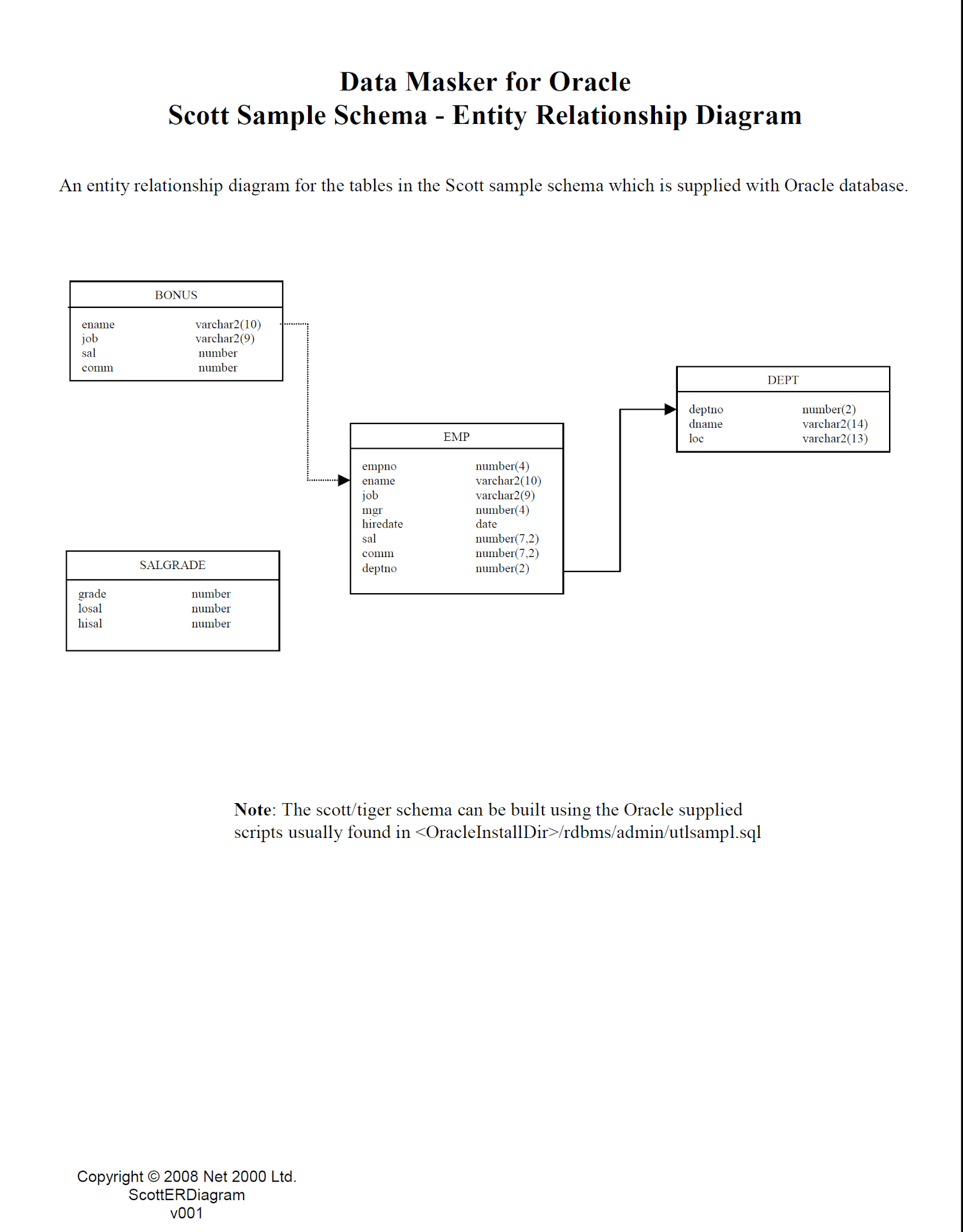
EMP, DEPT and SALGRADE Tables Data
--->> EMP Table
CREATE TABLE EMP
(EMPNO NUMBER(4) NOT NULL,
ENAME VARCHAR2(10),
JOB VARCHAR2(9),
MGR NUMBER(4),
HIREDATE DATE,
SAL NUMBER(7, 2),
COMM NUMBER(7, 2),
DEPTNO NUMBER(2));
INSERT INTO EMP VALUES (7369, 'SMITH', 'CLERK', 7902, TO_DATE('17-DEC-1980', 'DD-MON-YYYY'), 800, NULL, 20);
INSERT INTO EMP VALUES (7499, 'ALLEN', 'SALESMAN', 7698, TO_DATE('20-FEB-1981', 'DD-MON-YYYY'), 1600, 300, 30);
INSERT INTO EMP VALUES (7521, 'WARD', 'SALESMAN', 7698, TO_DATE('22-FEB-1981', 'DD-MON-YYYY'), 1250, 500, 30);
INSERT INTO EMP VALUES (7566, 'JONES', 'MANAGER', 7839, TO_DATE('2-APR-1981', 'DD-MON-YYYY'), 2975, NULL, 20);
INSERT INTO EMP VALUES (7654, 'MARTIN', 'SALESMAN', 7698, TO_DATE('28-SEP-1981', 'DD-MON-YYYY'), 1250, 1400, 30);
INSERT INTO EMP VALUES (7698, 'BLAKE', 'MANAGER', 7839, TO_DATE('1-MAY-1981', 'DD-MON-YYYY'), 2850, NULL, 30);
INSERT INTO EMP VALUES (7782, 'CLARK', 'MANAGER', 7839, TO_DATE('9-JUN-1981', 'DD-MON-YYYY'), 2450, NULL, 10);
INSERT INTO EMP VALUES (7788, 'SCOTT', 'ANALYST', 7566, TO_DATE('09-DEC-1982', 'DD-MON-YYYY'), 3000, NULL, 20);
INSERT INTO EMP VALUES (7839, 'KING', 'PRESIDENT', NULL, TO_DATE('17-NOV-1981', 'DD-MON-YYYY'), 5000, NULL, 10);
INSERT INTO EMP VALUES (7844, 'TURNER', 'SALESMAN', 7698, TO_DATE('8-SEP-1981', 'DD-MON-YYYY'), 1500, NULL, 30);
INSERT INTO EMP VALUES (7876, 'ADAMS', 'CLERK', 7788, TO_DATE('12-JAN-1983', 'DD-MON-YYYY'), 1100, NULL, 20);
INSERT INTO EMP VALUES (7900, 'JAMES', 'CLERK', 7698, TO_DATE('3-DEC-1981', 'DD-MON-YYYY'), 950, NULL, 30);
INSERT INTO EMP VALUES (7902, 'FORD', 'ANALYST', 7566, TO_DATE('3-DEC-1981', 'DD-MON-YYYY'), 3000, NULL, 20);
INSERT INTO EMP VALUES (7934, 'MILLER', 'CLERK', 7782, TO_DATE('23-JAN-1982', 'DD-MON-YYYY'), 1300, NULL, 10);
--->> DEPT Table
CREATE TABLE DEPT (DEPTNO NUMBER(2),DNAME VARCHAR2(14),LOC VARCHAR2(13) );
INSERT INTO DEPT VALUES (10, 'ACCOUNTING', 'NEW YORK');
INSERT INTO DEPT VALUES (20, 'RESEARCH', 'DALLAS');
INSERT INTO DEPT VALUES (30, 'SALES', 'CHICAGO');
INSERT INTO DEPT VALUES (40, 'OPERATIONS', 'BOSTON');
--->> SALGRADE Table
CREATE TABLE SALGRADE (GRADE NUMBER,LOSAL NUMBER,HISAL NUMBER);
INSERT INTO SALGRADE VALUES (1, 700, 1200);
INSERT INTO SALGRADE VALUES (2, 1201, 1400);
INSERT INTO SALGRADE VALUES (3, 1401, 2000);
INSERT INTO SALGRADE VALUES (4, 2001, 3000);
INSERT INTO SALGRADE VALUES (5, 3001, 9999);
COMMIT;
Sunday, September 13, 2020
Oracle Difference between Rank and Dense_Rank
To show the difference practically please
create a new table named dense_rank_demo for demonstration:
CREATE TABLE dense_rank_demo (
col VARCHAR2(10) NOT NULL
);
Next, insert some values into the dense_rank_demo table:
INSERT ALL
INTO dense_rank_demo(col) VALUES('A')
INTO dense_rank_demo(col) VALUES('A')
INTO dense_rank_demo(col) VALUES('B')
INTO dense_rank_demo(col) VALUES('C')
INTO dense_rank_demo(col) VALUES('C')
INTO dense_rank_demo(col) VALUES('C')
INTO dense_rank_demo(col) VALUES('D')
SELECT 1 FROM dual;
SELECT
col, RANK () OVER ( ORDER BY col ) My_rank,
DENSE_RANK () OVER ( ORDER BY col ) My_rank
FROM dense_rank_demo
SQL> /
COL MY_RANK MY_DENSE_RANK
---------- --------- -------------
A 1 1
A 1 1
B 3 2
C 4 3
C 4 3
C 4 3
D 7 4
7 rows selected.
COL MY_RANK MY_DENSE_RANK
---------- -------------- --------------------------
A 1 1
A 1 1
B 3 2
C 4 3
C 4 3
C 4 3
D 7 4
7 rows selected.
I think you can see the difference
Oracle DENSE_RANK() function
Oracle DENSE_RANK() function

The DENSE_RANK() is an analytic function that calculates the rank of a row in an ordered set of rows. The returned rank is an integer starting from 1.
The following shows the syntax of DENSE_RANK():
DENSE_RANK( ) OVER([ query_partition_clause ] order_by_clause)
In this syntax, the order_by_clause is required because the DENSE_RANK() function is ordered sensitive. The following is the syntax of the order by clause:
ORDER BY expression1 [,expression2,...] [ASC | DESC ] [NULLS FIRST | LAST]
If you omit the query_partition_by clause, the function will treat the whole result set as a single partition. Otherwise, the partition by clause will divide the result set into partitions to which the function applies.
PARTITION BY expression1 [,expression2, ...]
Note that the partition by clause must appear before the order by clause.
You will find the DENSE_RANK() function very useful for top-N and bottom-N queries.
Oracle DENSE_RANK() function examples
Let’s take a simple example to understand the DENSE_RANK() function:
Oracle DENSE_RANK() function illustration
First, create a new table named dense_rank_demo for demonstration:
CREATE TABLE dense_rank_demo (
col VARCHAR2(10) NOT NULL
);
Next, insert some values into the dense_rank_demo table:
INSERT ALL
INTO dense_rank_demo(col) VALUES('A')
INTO dense_rank_demo(col) VALUES('A')
INTO dense_rank_demo(col) VALUES('B')
INTO dense_rank_demo(col) VALUES('C')
INTO dense_rank_demo(col) VALUES('C')
INTO dense_rank_demo(col) VALUES('C')
INTO dense_rank_demo(col) VALUES('D')
SELECT 1 FROM dual;
Then, query data from the dense_rank_demo table:
SELECT col FROM dense_rank_demo;
After that, use the DENSE_RANK() function to calculate a rank for each row:
SELECT
col,
DENSE_RANK () OVER (
ORDER BY col )
col
FROM
dense_rank_demo;
The following picture shows the output:
Oracle DENSE_RANK illustration
As clearly shown in the output:
Rows with the same values such as first and second receive the same rank values.
Rank values are consecutive even in the event of ties.
Oracle DENSE_RANK() function examples
We’ll use the products table from the sample database to demonstrate the DENSE_RANK() function:
products table
The following example uses the DENSE_RANK() function to calculate rank values with the list price as a rank criterion for each product:
SELECT
user_code,
ITEM_PRICE,
RANK() OVER(ORDER BY ITEM_PRICE)
FROM
ITEMS;
Here is the partial output:
Oracle DENSE_RANK function example
To get the top-10 cheapest product, you use a common table expression that wraps the above query and selects only 10 products with the lowest prices as follows:
WITH cte_products AS(
SELECT
product_name,
list_price,
RANK() OVER(
ORDER BY list_price
) my_rank
FROM
products
)
SELECT * FROM cte_products
WHERE my_rank <= 10;
Thursday, September 10, 2020
Oracle dept and emp table script

create table dept( deptno number(2,0), dname varchar2(14), loc varchar2(13), constraint pk_dept primary key (deptno) )
/
create table emp(
empno number(4,0),
ename varchar2(10),
job varchar2(9),
mgr number(4,0),
hiredate date,
sal number(7,2),
comm number(7,2),
deptno number(2,0),
constraint pk_emp primary key (empno),
constraint fk_deptno foreign key (deptno) references dept (deptno)
)
/
insert into DEPT (DEPTNO, DNAME, LOC)
values(10, 'ACCOUNTING', 'NEW YORK')
1 row(s) inserted.
insert into dept
values(20, 'RESEARCH', 'DALLAS')
1 row(s) inserted.
insert into dept
values(30, 'SALES', 'CHICAGO')
1 row(s) inserted.
insert into dept
values(40, 'OPERATIONS', 'BOSTON')
1 row(s) inserted.
Insert EMP row, using TO_DATE function to cast string literal into an oracle DATE format.
insert into emp
values(
7839, 'KING', 'PRESIDENT', null,
to_date('17-11-1981','dd-mm-yyyy'),
5000, null, 10
)
/
1 row(s) inserted.
insert into emp
values(
7698, 'BLAKE', 'MANAGER', 7839,
to_date('1-5-1981','dd-mm-yyyy'),
2850, null, 30
)
/
1 row(s) inserted.
insert into emp
values(
7782, 'CLARK', 'MANAGER', 7839,
to_date('9-6-1981','dd-mm-yyyy'),
2450, null, 10
)
/
1 row(s) inserted.
insert into emp
values(
7566, 'JONES', 'MANAGER', 7839,
to_date('2-4-1981','dd-mm-yyyy'),
2975, null, 20
)
/
1 row(s) inserted.
insert into emp
values(
7788, 'SCOTT', 'ANALYST', 7566,
to_date('13-JUL-87','dd-mm-rr') - 85,
3000, null, 20
)
/
1 row(s) inserted.
insert into emp
values(
7902, 'FORD', 'ANALYST', 7566,
to_date('3-12-1981','dd-mm-yyyy'),
3000, null, 20
)
/
1 row(s) inserted.
insert into emp
values(
7369, 'SMITH', 'CLERK', 7902,
to_date('17-12-1980','dd-mm-yyyy'),
800, null, 20
);
1 row(s) inserted.
insert into emp
values(
7499, 'ALLEN', 'SALESMAN', 7698,
to_date('20-2-1981','dd-mm-yyyy'),
1600, 300, 30
);
1 row(s) inserted.
insert into emp
values(
7521, 'WARD', 'SALESMAN', 7698,
to_date('22-2-1981','dd-mm-yyyy'),
1250, 500, 30
)
1 row(s) inserted.
insert into emp
values(
7654, 'MARTIN', 'SALESMAN', 7698,
to_date('28-9-1981','dd-mm-yyyy'),
1250, 1400, 30
);
1 row(s) inserted.
insert into emp
values(
7844, 'TURNER', 'SALESMAN', 7698,
to_date('8-9-1981','dd-mm-yyyy'),
1500, 0, 30
)
1 row(s) inserted.
insert into emp
values(
7876, 'ADAMS', 'CLERK', 7788,
to_date('13-JUL-87', 'dd-mm-rr') - 51,
1100, null, 20
)
1 row(s) inserted.
insert into emp
values(
7900, 'JAMES', 'CLERK', 7698,
to_date('3-12-1981','dd-mm-yyyy'),
950, null, 30
);
1 row(s) inserted.
insert into emp
values(
7934, 'MILLER', 'CLERK', 7782,
to_date('23-1-1982','dd-mm-yyyy'),
1300, null, 10
);
1 row(s) inserted.
Simple natural join between DEPT and EMP tables based on the primary key of the DEPT table DEPTNO, and the DEPTNO foreign key in the EMP table.
select ename, dname, job, empno, hiredate, loc
from emp, dept
where emp.deptno = dept.deptno
order by ename
ENAME DNAME JOB EMPNO HIREDATE LOC
ADAMS RESEARCH CLERK 7876 23-MAY-87 DALLAS
ALLEN SALES SALESMAN 7499 20-FEB-81 CHICAGO
BLAKE SALES MANAGER 7698 01-MAY-81 CHICAGO
CLARK ACCOUNTING MANAGER 7782 09-JUN-81 NEW YORK
FORD RESEARCH ANALYST 7902 03-DEC-81 DALLAS
JAMES SALES CLERK 7900 03-DEC-81 CHICAGO
JONES RESEARCH MANAGER 7566 02-APR-81 DALLAS
KING ACCOUNTING PRESIDENT 7839 17-NOV-81 NEW YORK
MARTIN SALES SALESMAN 7654 28-SEP-81 CHICAGO
MILLER ACCOUNTING CLERK 7934 23-JAN-82 NEW YORK
SCOTT RESEARCH ANALYST 7788 19-APR-87 DALLAS
SMITH RESEARCH CLERK 7369 17-DEC-80 DALLAS
TURNER SALES SALESMAN 7844 08-SEP-81 CHICAGO
WARD SALES SALESMAN 7521 22-FEB-81 CHICAGO
14 rows selected.
Subscribe to:
Posts (Atom)